Scientific · Symbolic · Graphing

ABA-X1

Advanced Browser Algebra – a calculator for desktop and web

Exact results first, a computer algebra system that checks its own answers, and a plotter that never draws a line through a pole – driven entirely from your keyboard.

Free and open source (MIT). Runs in your browser – offline after the first visit – or as an app for macOS, Windows and Linux. Nothing you type leaves your device.

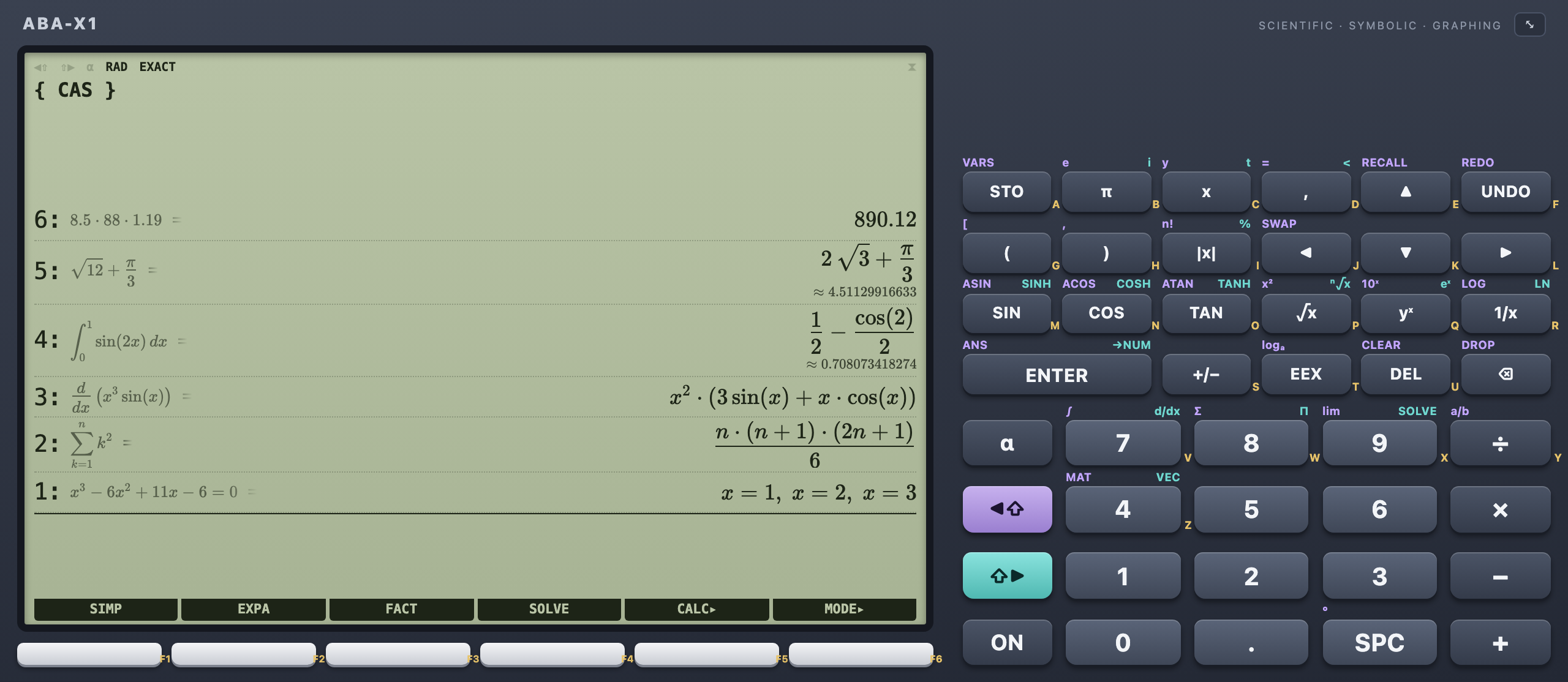
ABA-X1 in full size: a large green display with a stack of results – 890.12, 2√3 + π/3, the integral of sin 2x from 0 to 1 as 1/2 − cos(2)/2 ≈ 0.708, a derivative, a sum formula and the solutions x = 1, 2, 3 – and the keypad on the right
Why

A calculator that shows its work

I wanted the calculator I loved at university – stack, softkeys, shift keys – but with the mathematics of today: fractions that stay fractions, roots that stay roots, integrals that come back as formulas.

And I wanted to trust it. So every answer of the computer algebra system is checked numerically before ABA-X1 shows it. If the check fails, you get an honest message instead of a wrong result.

Marc Kronberg

Features

Three modes, one calculator

The softkeys switch between them – F1 Standard, F2 CAS, F3 Graph.

Exact first, decimal underneath

½ stays ½. √8 becomes 2√2.

Type naturally – fractions, roots, powers, integrals – and press ENTER. Every stack level shows what you typed, the exact result and its decimal value. Click a level to edit it and ENTER replaces it in place.

  • Degrees or radians, exact or decimal (⌥R ⌥E)
  • RPN when you want it: an operator on an empty line works on the stack
  • Variables and your own functions: a = 5, f(x) = x² − 3x + 2
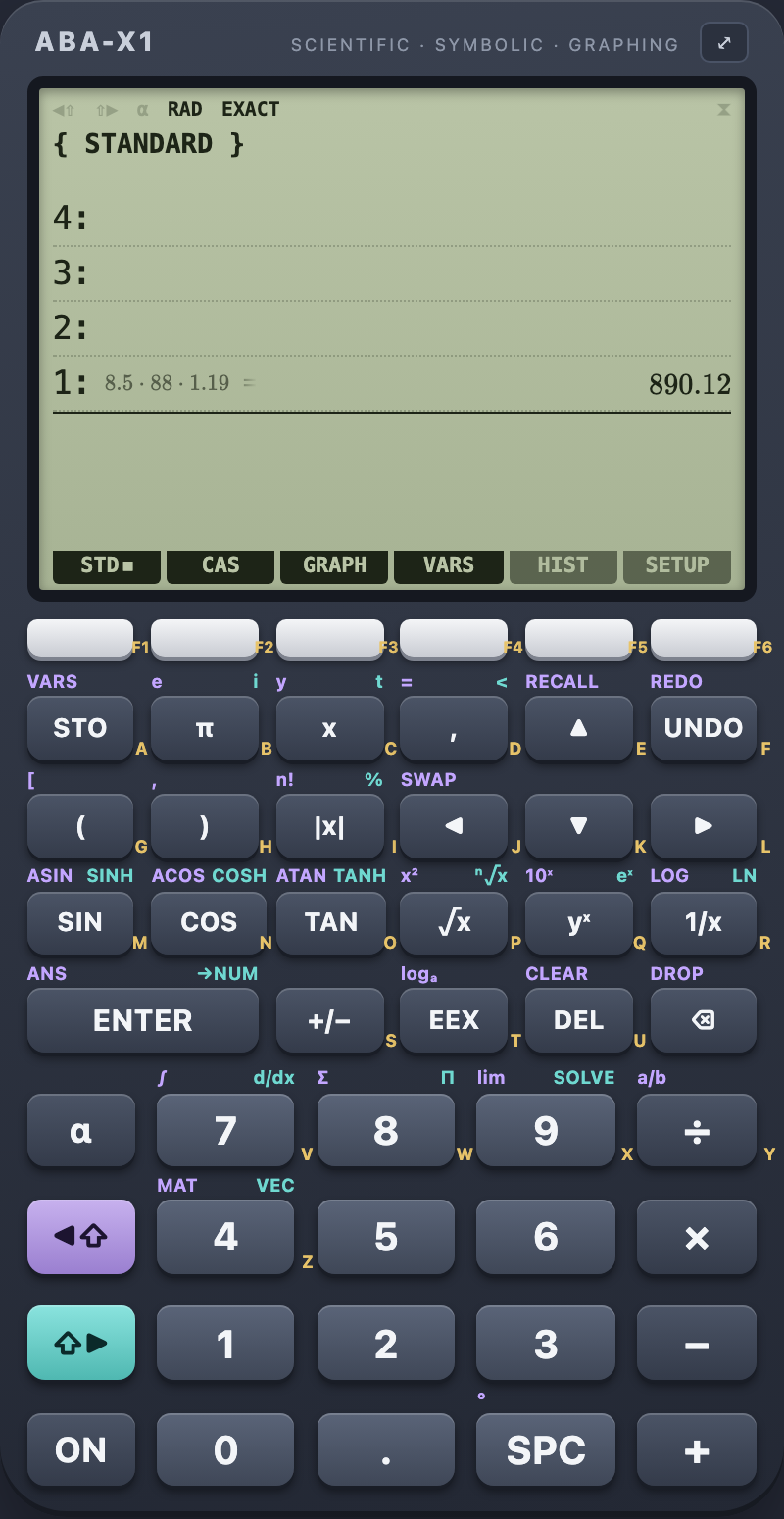
The calculator in the standard mode: 8.5 · 88 · 1.19 = 890.12 on stack level 1

Algebra that double-checks itself

Simplify, factor, solve, differentiate, integrate.

The CAS mode turns the softkeys into SIMP, EXPA, FACT and SOLVE, with a calculus menu for derivatives, antiderivatives, definite integrals and limits. Every answer is put back into the original numerically – a failed check is never shown.

  • ∫₀¹ sin 2x dx½ − cos(2)/2 ≈ 0.70807
  • sin x = ½x = π/6 + 2nπ, 5π/6 + 2nπ
  • ∫₋₁¹ dx/x²an honest error – not −2
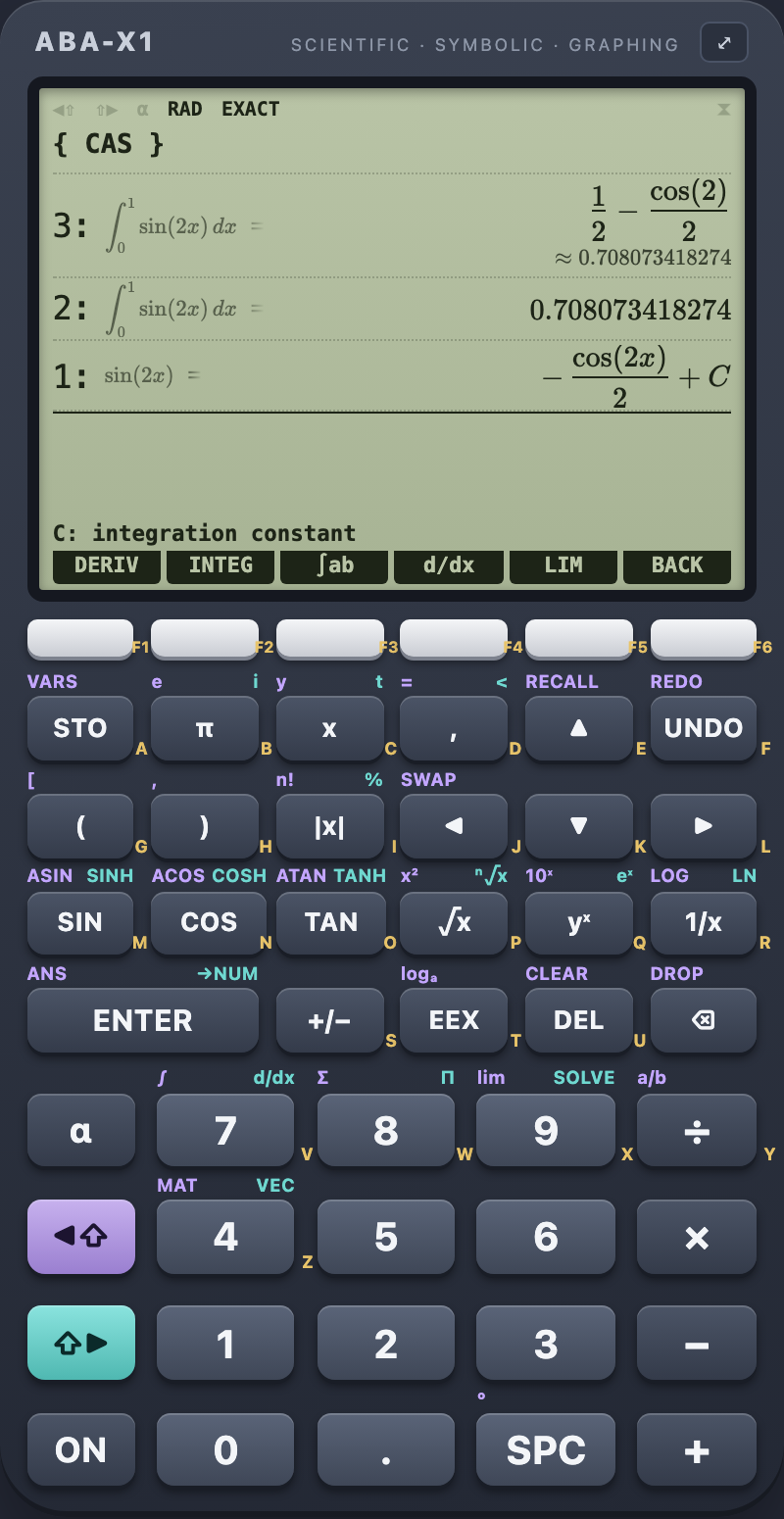
The CAS mode: the integral of sin 2x from 0 to 1 exactly as 1/2 − cos(2)/2 with its approximation, the same as a decimal, and the antiderivative −cos(2x)/2 + C

A plotter that respects poles and jumps

tan x without vertical lines. floor x with real steps.

Up to six functions at once, told apart by line style like on a real LCD. Zoom and pan with the keyboard, mouse, wheel or two fingers; trace a curve; find zeros, extrema, intersections and tangents; shade a signed area. Export as PNG or SVG.

Pan, zoom
← → ↑ ↓ + −
Analyse
ROOT · EXTR · ISECT · TANG · ∫AREA
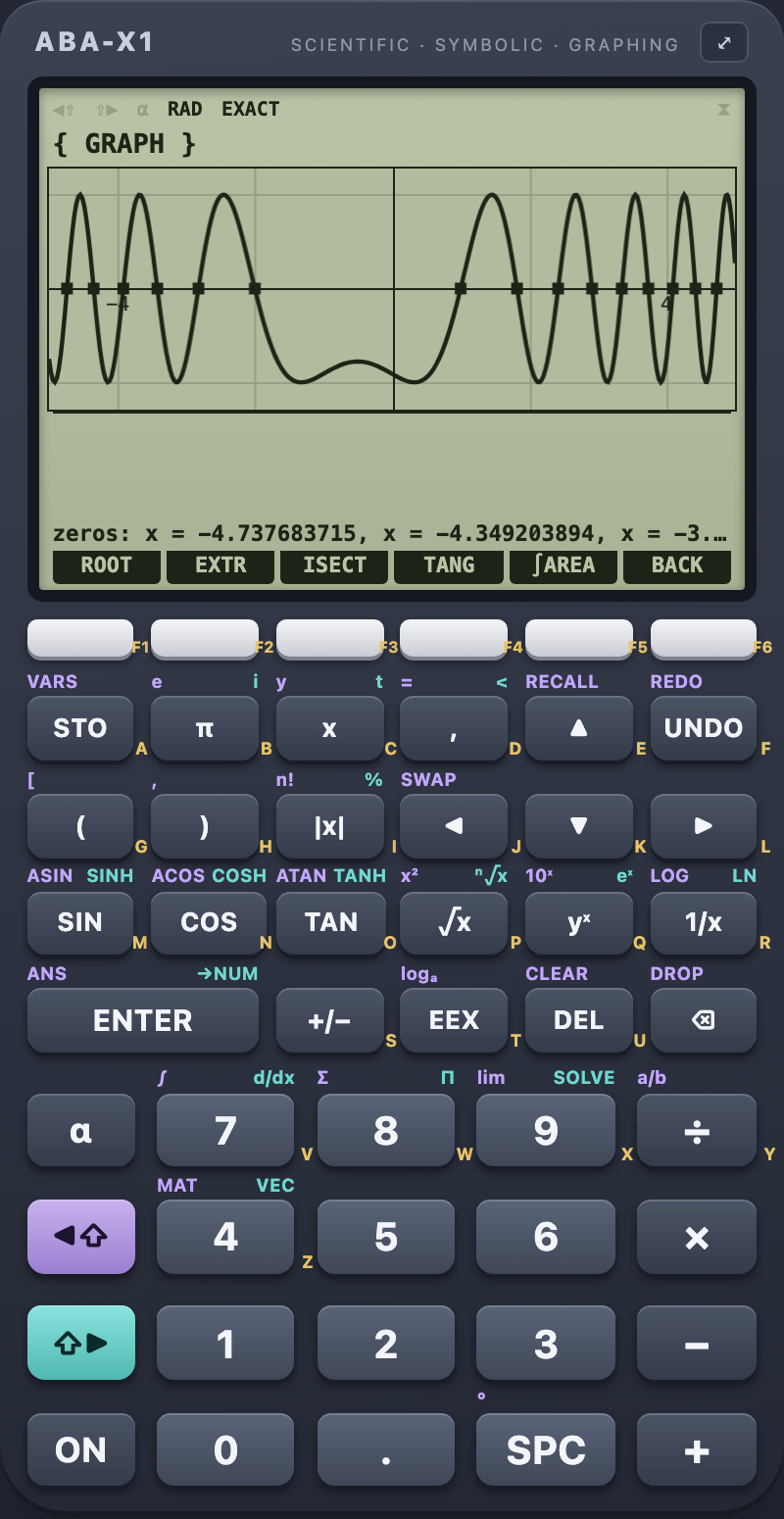
The graph mode: sin((x − 1)(x + 2)) between −5 and 5 with all zeros marked
ANLYZ ▸ ISECT

Plotted, not guessed

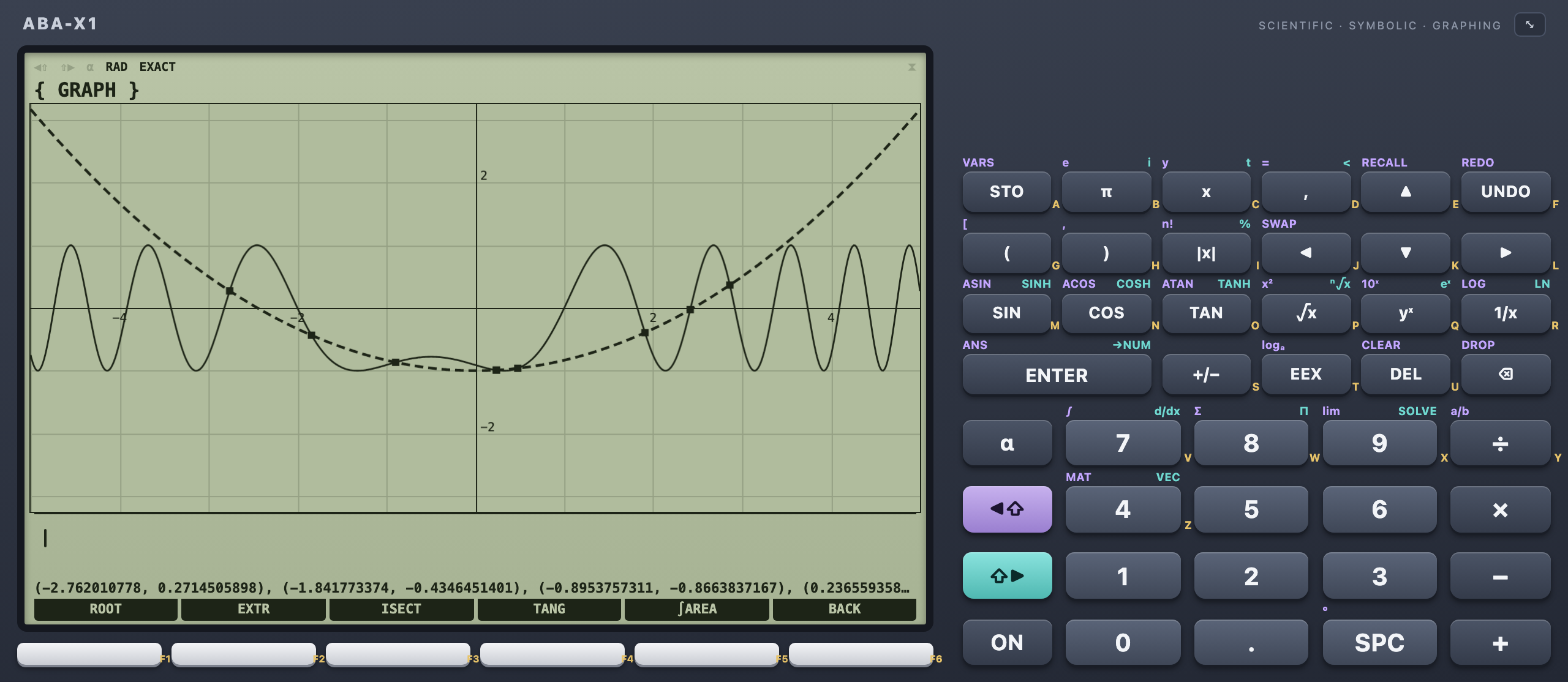
sin((x − 1)(x + 2)) and the parabola x²/6 − 1 – eight intersections, each one found numerically to ten digits.

04 · Full size

All the screen you have

One key – ⌥F – and display and keypad fill the window. On a wide screen the keypad moves beside a big display; on a phone the calculator fills the screen.

Full size in a wide window: the plot of sin((x − 1)(x + 2)) and the parabola x²/6 − 1 with all intersections marked, the keypad on the right
The same two functions in the app – intersections with ANLYZ ▸ ISECT
Details

Small details, done properly

A calculator is used every day. These are the things that make it pleasant.

  • Offline and privateAll mathematics runs on your device. No account, no tracking, no server – the web app works without a network after the first visit.
  • Desktop and web, same resultsOne code base: the app for macOS, Windows and Linux and the web version compute exactly the same.
  • Textbook notationFractions, roots, integrals, sums and matrices as you know them from paper – typed or from the keypad.
  • History with favouritesEvery calculation is kept; star the ones you need again and re-use input or result with one key.
  • Export and importVariables, functions, history and settings in one file – move them between desktop and web.
  • English and GermanSwitch the language at any time; the native menu follows.
  • Honest about limitsNo elementary antiderivative? Complex result? Diverging integral? You get a clear message, never a made-up number.
  • AccessibleEvery key is reachable by keyboard and has a name for screen readers; checked with axe in Chromium and WebKit.
Keys

Hands on the keyboard

Mouse and touch work too – but every key of the calculator is one key on your keyboard away. ⌘ on macOS, Ctrl on Windows and Linux; ⌥ is Alt.

Calculating

Type a formula
just type
Evaluate
Enter
Decimal value (→NUM)
⇧ Enter
Clear line, cancel
Esc
Browse and edit the stack
↑ ↓ Enter
DROP, SWAP
⌥ ⌫ ⌥ S
Shift keys on the keypad
◀⇧ ⇧▶

Everything else

Softkeys: modes and menus
F1 … F6
Radians ⇄ degrees
⌥ R
Exact ⇄ decimal
⌥ E
Full size
⌥ F
Settings
⌘ ,
Export, import
⌘ S ⌘ O
All shortcuts
⌘ /
Platforms

In the browser and on the desktop

The web app needs nothing but a modern browser. The desktop app is built with Tauri and Rust – small, fast and with a native menu.

  • Web

    Chrome, Edge, Safari or Firefox – installable, works offline

    Open now
  • macOS

    12 Monterey or later, Apple Silicon and Intel – .dmg

    Download
  • Windows

    10 or 11, x64 – installer or .msi

    Download
  • Linux

    WebKitGTK 4.1 – .deb, .rpm, AppImage

    Download

All packages and release notes: github.com/krocon/aba-x/releases

FAQ

Questions

Is it free?

Yes. ABA-X1 is open source under the MIT license – read the code, change it, use it.

Can I trust the results?

Every symbolic answer is checked numerically at several points before it is shown: a derivative is compared with a numerical derivative, an antiderivative is differentiated again, solutions are put back into the equation, a definite integral is compared with numerical integration. Answers that fail are not displayed – you get a message instead.

Does it send my calculations anywhere?

No. Everything runs on your device – also in the browser. There are no accounts, no cookies for tracking and no server that computes for you. Your variables and history stay in your browser's storage or in the app's data folder.

What can the computer algebra do?

Simplify, expand, factor, solve equations (also with general solutions like x = π/6 + 2nπ) and systems, derivatives (also partial and of higher order), antiderivatives, definite and improper integrals and limits. Complex numbers, matrices as calculations and inequalities come later.

Where do I get the desktop app?

On the releases page on GitHub: .dmg for macOS, installer or .msi for Windows, .deb, .rpm or AppImage for Linux. If a package is not signed, macOS or Windows may ask once before the first start.

Is it a copy of a well-known calculator?

No. ABA-X1 is inspired by the classic graphing calculators – stack, softkeys, shift keys – but has its own design, its own key layout and no connection to any calculator manufacturer.

Which languages?

English and German, switchable at any time in the settings.

Ready

Try it now

No account – open it in your browser, or download the app for your desktop.